
Get the Information You Need, Faster.
Finding the right product information doesn't mean you need to search through multiple articles, guides, and tutorial videos. The Gemini Sign Assistant makes it easier to get the answers you need by using AI-powered search to find relevant information across Gemini's Product Guide resources.
Whether you're researching a product, comparing options, checking specifications, or looking for educational resources, the Gemini Sign Assistant can help you spend less time searching and more time getting things done.
Accessing the Gemini Sign Assistant
You can access the Gemini Sign Assistant two ways in your Partner Portal account.
- Log in to Partner Portal.
- From the main dashboard view, click Ask the Gemini Sign Assistant under Product Guide & Portal Tutorials box to the right of the screen.
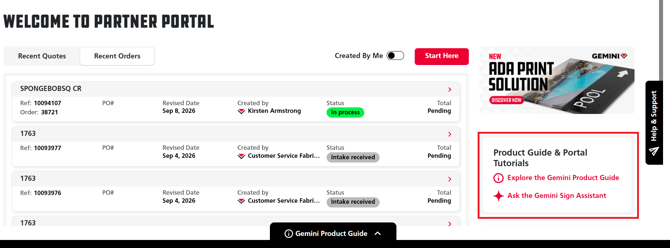
3. Or click Gemini Product Guide tab.
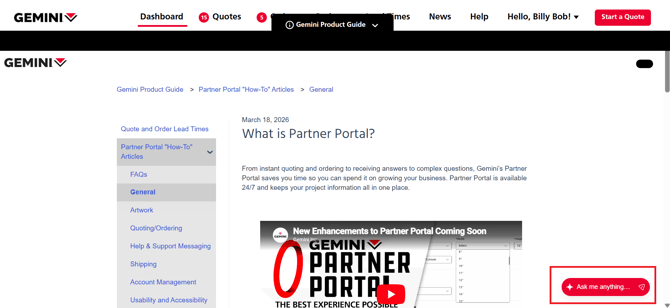
4. Select Ask Me Anything button in the lower right corner of the screen to start a conversation with Gemini Sign Assistant.
How Can the Gemini Sign Assistant Help?
Think of the Gemini Sign Assistant as a faster way to navigate Gemini's Product Guide. Instead of searching through articles to find what you're looking for, you can ask a question and let the Sign Assistant point you toward the relevant information.
|
Find Product Information |
Learning & Support Resources | Get Technical Information |
|
|
|
What Does the Gemini Sign Assistant Not Do? |
||
|
The Gemini Sign Assistant is designed to help you find information, not complete Partner Portal requests, processes, or replace Gemini's support teams.
|
||
|
Tips for Getting the Most Out of the Gemini Sign AssistantYou don't need to phrase your questions a certain way, but specific questions generally lead to more useful results. For the best experience:
|
||
|
||
It's Simple. Ask a Question. Get an Answer. Find the Source. Keep Moving.
The Gemini Sign Assistant is available in Partner Portal as part of the Gemini Product Guide. Give it a try the next time you're looking for product information, specifications, capabilities, or resources.
Ready to get answers faster? Try the Gemini Sign Assistant today.

